


TCL QM9K Review: The Brightest TV Yet Faces Off Against OLED
Pros
- Performs similarly to Sony’s OLED
- Excellent brightness
- Backlight blooming virtually nonexistent
Cons
- OLED is still better
- Color isn’t accurate
- Occasionally crushes shadow detail
When Airbnb started, its promise was that you could get accommodation that was cheaper, and sometimes better, than a hotel. This philosophy is what I want from a high-end LED TV: If it’s going to take on OLED, the current picture quality champion, I want it to do the same job but cheaper and better.
The TCL QM9K is one of many higher-end 2025 TVs attempting this feat. And it can certainly do one thing better than any other TV — whether OLED or not — and that’s be bright. The TCL QM9K is currently the brightest TV I’ve ever tested in the CNET lab, but that’s not the whole story.
While the less expensive QM8K is a fully formed and impressive TV, and recipient of CNET’s Editors’ Choice award, the pricier QM9K isn’t quite as accomplished. I actually liked the picture quality slightly better on the cheaper model, especially its shadow detail. I suspect this could be a function of TCL flooring the QM9K’s accelerator for all that extra brightness.
On the positive side, the TCL QM9K’s brightness is an asset in well-lit rooms, it does improve the look of games, and the TV still costs less than flagship OLED models like the LG G5 and Sony Bravia 8 II. This TV also offers better gaming response times than most high-end models, even though there was some slight motion blur.
If you tend towards gaming almost exclusively, then the QM9K is a good match with its high brightness and zippy response. Alternatively, if you want the best picture for the same money then the answer is easy — get the LG G5 or, for less money, the Hisense U8Q or TCL QM8K.
TCL QM9K series TV sizes
I performed hands-on testing of the picture quality of the 65-inch TCL QM9K but this review also applies to the other screen sizes in the series. All sizes have similar specifications and should exhibit similar picture quality.
Design
The QM9K shares a family resemblance with other TCL TV I’ve tested, but its finish isn’t as fancy as I might expect from a flagship. For instance, the green-grey logo tab is a little plain-looking, and the stand is the same two-piece plastic-and-metal stand you’ll see from the QM6 and up. As someone who regularly puts together TV bases, I appreciate a stand that doesn’t require an extra set of hands, but there is a trick to the interlocking panels.
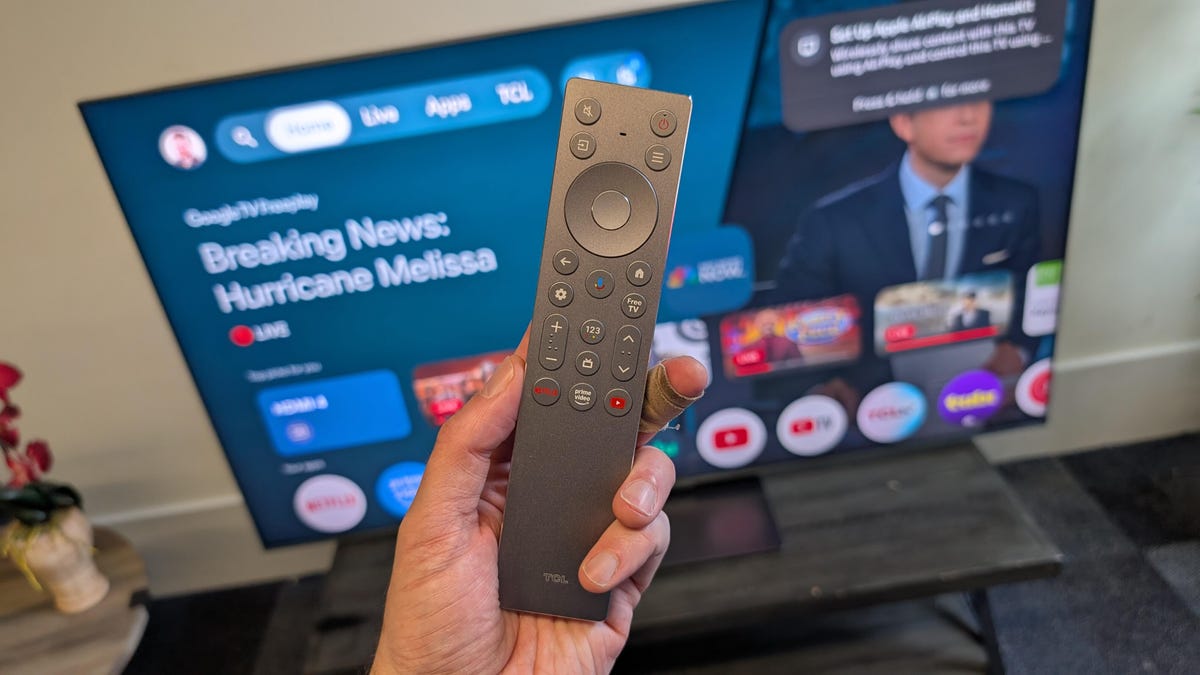
TCL remote in front of a QM9K TV
The TCL QM9K has something that’s rarer than it should be at this level: a backlit remote. It’s a fairly plush model too, with a metal facade and dedicated controls for the TV’s HDMI inputs. The control is a step up from the “Twix bar” that shipped with 2024 models.
Features
The TCL QM9K has four HDMI inputs
While TCL claimed its QM8K TV offered “contrast and color gamut comparable to OLED,” the company has toned down the comparisons for this step-up model. The QM9K uses 6,000 local dimming zones (up from the QM8K’s 5,000) in its mini-LED backlight. It’s able to dim and brighten different areas simultaneously, increasing the contrast and therefore picture quality.
New for 2025 is the company’s Halo Control system, designed to eliminate backlight bleed in several ways, including reducing the number of layers between the LCD panel and the front of the TV.
The TCL QM9K is a 4K TV which includes compatibility with most HDR standards, including Dolby Vision (in addition to the light sensing Vision IQ), HDR10 Plus, HDR10 and HLG. On the audio side, the TV is compatible with Dolby Atmos and has speakers tuned by Bang and Olufsen.
New for the 2025 model is Filmmaker mode and while I found it to be virtually identical to Movie mode, its addition is helpful for people familiar with the benefits of Filmmaker mode from other TVs.
Connections include:
- RF Input (NTSC, ATSC, ATSC 3.0)
- Ethernet
- Wi-Fi 6
- 1x USB 2.0, 1x USB 3.0
- 4x HDMI (1x eARC)
- Optical digital audio
Gemini spy with my little eye
TCL QM9K’s smart TV interface
Google TV is one of the most popular smart TV systems and it’s used by a number of brands, including Sony, TCL and Hisense. As a result, it means this QM9K TV is more likely to receive regular updates and new features such as Google Home integration. For instance, the TV can integrate with a Nest-based smart home and display your cameras on the Home tab as well. The QM9K was also the first TV to feature Google’s new AI assistant: Gemini.
Do you actually need generative AI on your TV? Not really. It can write you a poem if you want that, but where it could be useful is by being more intuitive when answering your questions: “What time is the game?” and “Is there a new episode of SNL this week?” and so on. You can ask your TV — with its integrated microphone — to play an episode of Alien: Earth, for example, and it will start from where you left off.
The Gemini interface after you ask it a query
I compared the QM9K’s Gemini against Alexa Plus on the new Amazon Echo Studio by asking both assistants to tell me the worst Star Wars movie. The Echo chose The New Jedi Order — a film which hasn’t even been released yet. Alexa told me this movie suffered from “rushed content” and tried too hard to “balance appeal for young audiences.”
Meanwhile, Gemini on Google TV did better with this query, listing three films that were actually released. Unsurprisingly, it said the worst was The Rise of Skywalker.
TCL TVs were previously offered with a number of different systems, including Roku, but this changed after Roku took development of most of its TVs in-house. If you’re a “content first” kind of person — that is, you can never remember which app a show is on — Google TV does a great job of surfacing recently watched programs. It works in a similar way to Fire TV, but you can also set up shortcuts to your favorite apps.
TCL’s Google TV interface is relatively zippy. If you want more power or customization, you could add a separate set-top from Apple or Roku — although most people won’t need to.
Sony Bravia 8 II vs. LG G5 vs. TCL QM9K : Picture quality compared
TV and movies
I compared the TCL with two competitive flagships: the Bravia 8 II and LG G5 OLED TVs. Given the large gap in street price (size dependent) between the $2,000 TCL and LG and the $3,300 Sony, it was surprising to see that LG was the best TV of the bunch.
I began my evaluations with the opening sequence of the 2017 horror movie It (4K HDR10), as the camera follows Georgie (Jackson Robert Scott) as he walks through the house and enters the basement. I compared the three TVs as the character hesitated at the top of the stairs, as this frame helps test a screen’s ability to reproduce low-level detail.
The TCL had the poorest shadow detail of the three models, with some crushing of the darker parts of the image, and the dimmest highlights from the ajar door behind Georgie. Meanwhile, the LG was the best at illuminating his face, while the TCL and Sony were very similar.
Next I watched the ruined city sequence from the movie 1917 (ch 9). In the opening scene the entire screen is almost black and it’s a great test for TVs like the QM9K — as LED backlights can tend to look gauzy with the details presented here. Though the TCL QM9K performed better during this section, there was still some whispiness and both the G5 and Sony looked better. As the scene progresses and the soldier ventures into the city, the LG has the brightest highlights as the flares streak across the sky. In these scenes, the Sony and TCL behaved similarly again, though the TCL did handle the mixed scenes of extreme light and dark well, while the G5 had an extra contrast punchiness.
In order to test the TVs’ ability to display non-HDR content I watched the Firefly episode Out of Gas in standard definition. At the start of the episode, you see the Serenity marooned in space set against a large starfield. On the Sony and LG, the individual stars were brighter, though the TCL showed no signs of backlight leakage on the edges of the ship. As a whole, though, the QM9K looked similar to the Sony — which is good for the TCL.
Lastly, I spun the Spears and Munsil 4K test disk to evaluate each TV’s ability to handle picture quality aspects such as color, shadow and white detail.
Sony had the best white detail at the 34 second mark (@4,000 nit) — a snow scene featuring horses with more of the trees visible. This was followed by the TCL — which was also the brightest — then the LG, and while this other OLED was brighter than the Sony it lost the detail.
Color was a little muted on the TCL compared to the other TVs, with less saturation in both blues and reds. Interestingly, during the sunset scene, the Sony was the only one which displayed the yellow sun against a cloudy backdrop. This TCL is the first time I’ve seen another TV fail to reproduce the sun outside of an LG.
Gaming
Why is the TCL QM9K so bright? Ostensibly it’s for HDR performance, but where I saw benefits was in gaming. The TCL QM9K can go really bright, but it was only a little brighter than the G5 during normal gaming.
The QM9K was bright while the LG G5 was both bright and dramatic, helped by OLED’s better black levels. The Sony had the least punchy-looking game mode. It was bright and everything was visible, but it had a tendency to look washed out when there were bright day scenes and lighter walls.
Noticeably, the TCL showed some slight blur during gaming — in game mode — that wasn’t visible on the OLEDs. I found this during fast-paced games like Call of Duty or Doom Eternal.
In a related category, I did find one very odd thing when testing the TV’s input lag — when I didn’t use Gaming mode it had the worst latency of any TV CNET has ever tested. It was over half a second! When engaged, though, it was competitive with most TVs at the price at around 10ms. Usually, a “bad” TV will top out around 100ms — which is still appreciable — but this was five times that. The moral is: always play games on the QM9K in gaming mode!
Bright lighting
With its super-bright screen, I tested up to a maximum of 4,500 nits in Vivid HDR mode, this TV is very watchable in a lit room. Even in Filmmaker it’s still capable of 4K nits and so there’s no problem there — as long as you turn off Dolby Vision IQ.
However, there was a downside to the TV’s bright room performance, it was the most reflective of the three TVs I tested, followed by the LG then ending with the Sony. The QM9K has a slightly glossy screen, which is great for increasing perceived contrast. But if you have a light source shining on the screen — like a window — it will be distracting.
Light output in nits
undefined
| TV | Brightest mode (HDR) | Accurate mode (HDR) | Brightest mode (SDR) | Accurate mode (SDR) |
|---|---|---|---|---|
| TCL QM9K | 4520 | 2520 | 3930 | 262 |
| Hisense U8Q | 4080 | 4070 | 4107 | 436 |
| TCL QM8K | 3011 | 3011 | 3038 | 196 |
| LG G5 | 2813 | 2297 | 1030 | 412 |
| Samsung S95F | 2150 | 2150 | 391 | 297 |
Sound
No matter what kind of model you have, the best way to improve your TV sound is to use a separate speaker — either a soundbar or other AV system. Nevertheless, many people don’t have the space or inclination for more boxes in their living space, and so rely on the TV’s own sound. I tested the speakers of all three units, using their default sound modes, and listened to a mix of movies, gaming and music.
All of these TVs have Dolby Atmos capability — for better or worse — and so I tested them with the 4K stream of Mad Max: Fury Road. I found that the TCL QM9K’s sound had plenty of “move-aroundiness” with effects coming from above and beside the TV. Even so, Tom Hardy’s deep voice was indistinct and there was no bass underpinning it.
Meanwhile, the Sony sounded better than TCL with improved articulation in Hardy’s voice, and there were some height effects as well. It was the LG which sounded best, though, with real movement in its surround effects, and Hardy’s voice sounded the most natural with plenty of bass.
Settings and picture mode notes
TCL QM9K test results
undefined
| Test | Result | Score |
|---|---|---|
| Black luminance (0%) | 0.000 | Good |
| Peak white luminance (SDR) | 3930 | Good |
| Avg. gamma (10-100%) | 1.99 | Poor |
| Avg. grayscale error (10-100%) | 4.50 | Average |
| Dark gray error (30%) | 3.37 | Average |
| Bright gray error (80%) | 5.89 | Poor |
| Avg. color checker error | 2.39 | Good |
| Avg. saturation sweeps error | 2.84 | Good |
| Avg. color error | 3.67 | Average |
| 1080p/24 Cadence (IAL) | Pass | Good |
| Input lag (Game mode) | 10.17 | Good |
| HDR10 | ||
| Black luminance (0%) | 0.000 | Good |
| Peak white luminance (10% win) | 4520 | Good |
| Gamut % UHDA/P3 (CIE 1976) | 97.25 | Good |
| ColorMatch HDR error | 5.26 | Poor |
| Avg. color checker error | 5.75 | Poor |
| Input lag (Game mode, 4K HDR) | 9.47 | Good |
Though it’s hard to spot where the TV steers wrong in terms of color, bar testing it side by side with other TVs, the differences were obvious when testing with the Konica Minolta meter. As the results below suggest, the TCL has poor color and greyscale response — even in its best mode (Filmmaker). Furthermore, gamma was unusually poor on the movie-centric modes — hovering around the 2.0 mark.
Portrait Displays Calman calibration software was used in this review.
Read more: How We Test TVs
First Appeared on
Source link






